Sky Kish

KISH OR M N - - - > Sky Kish Sky Kish

Wednesday, September 18, 2013

HOW TO MAKE WINDOWS XP SP3 :~

1. Windows xp Sp3 at Home (NLIT).
      Click here to Download :~   Windows xp NLIT Download 

2. Windows xp SP1 or SP2 CD.
      Click here to Download :~    XP Service Pack 3

Now you restart your computer and check service pack
- - -> To  check Go to start --> Run --> Type Winver

Sky kish

HOW TO MAKE COMPUTER SHUTDOWN FASTER :~

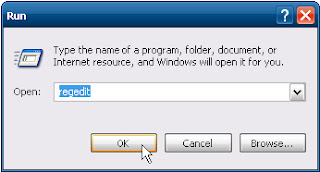
Go to Start Menu ---> Run ---> Regedit


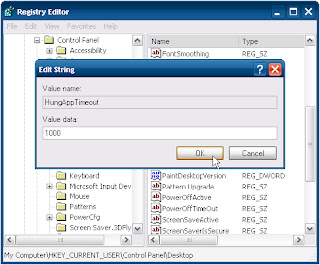
Then Goto   HKEY_CURRENT_USER\Control Panel\ Desktop Scroll Down to HUNGAPPTIMEOUT
and Change the default 5000 to 1000 then click ok.


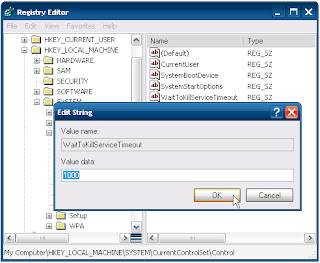
Next goto  HKEY_LOCAL_MACHINE\System\CurrentControlset Control then double click in waittokillservertimeout to 1000        then click Ok.


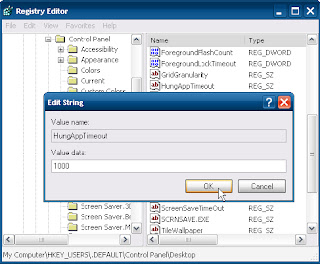
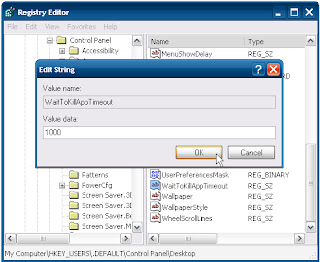
HKEY_USER\Default\Control Panel\Desktop then change Hingapptimeout to 1000 and click Ok.


Scroll down to waittokillaptimeout change value 1000 then Click ok


Now Close all the things then restart your Computer Or Shutdown your computer you can see that change...

Sky kish 
HOW TO TYPE INDIAN LANGUAGE :~

1. Go to above link, then select Kannada or whatever language you wanna type.
2. Then click on download.
3. After Download do the following step.

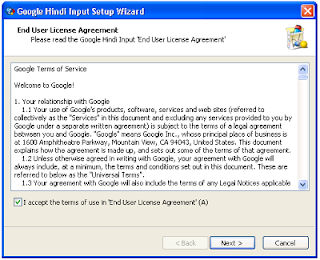
Double click on that Download file and it will be like this 


Then Click on -----> Next


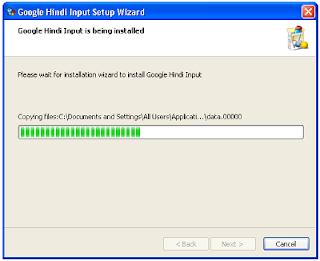
Then wait till complete


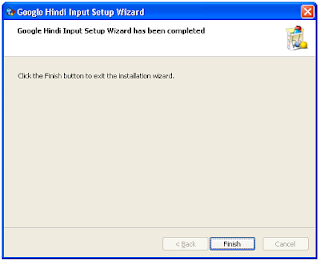
Then Click on Finish

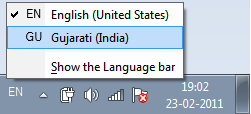
   Then you will get language bar on task bar like follow 


                                  Then Start Typing .............

Click here to Download Software :~ Download Google translate indian language

Sky kish


HOW TO PUT CORRUPTED FILE IN XP :~

Somtime you have problem of Corrupted File in XP ... so the following is Solution....

1.     Put XP cd into Drive.
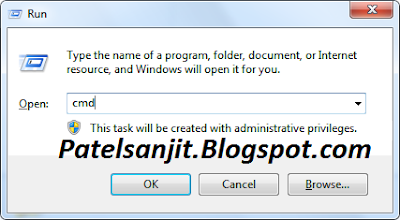
2.     Goto Start menu and Click on Run.
3.     Now in RUN type CMD and Press Enter.


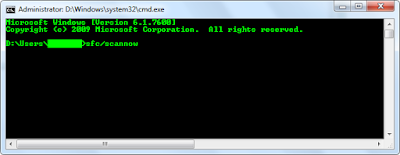
4.     In CMD type sfc/scannow and press Enter


5.     Now Just wait till CMD copy the corrupted file from XP CD.

Sky kish


HOW TO SAVE ANY WEBPAGE AS PDF OR IMAGE. :~


Firefox (Any Version) (If you don't  have it, then go at Bottom of this post)

Follow the steps.

 1.     Open your Firefox (If dont't have Download it)
 2.     Then go to 
 3.     Then click on Download or Continue to Download
          then downloading and installing process will start it self.

            After Installing, Firefox will ask to Restart. so please restart it to install that add-ons completely. (Please Bookmark my Blog because it might close all the website and start it again)
now after restart go to Tools Menu --> pdfit -->Save as .....

if you simply want to save whole page as PDF. Press Alt+3. and Boom.. you have save dialogue to save whole page as PDF.. Other options are in Tools Menu.

many people complaining that we don't have firefox. Dont'tworry. i have solution fot it.

Open any webpage you like to save as PDF. then Copy its Url (http://www.whatever.com/...)   then go to Online Access and download save as pdf also available  "http://web2pdfconvert.com" and Paste that URL on this website and click on "Convert to PDF.. Wait and your PDF is ready to Download.

Click here to Online Access to Pdf formate any website page :~ http://web2pdfconvert.com

Sky kish

Tuesday, September 17, 2013

ON-LINE TYPING TEST :~


Which one you want Click and Test your Speed !!!

Click here to Access to Type      :~         Online Typing Test 01
Click here to Access to Type      :~         Online Typing Test 02 
Click here to Access to Type      :~         Online Typing Test 03
Click here to Access to Type      :~         Online Typing Test 04
Click here to Access to Type      :~         Online Typing Test 05
Click here to Access to Type      :~         Online Typing Test 06
Click here to Access to Type      :~         Online Typing Test 07

Sky kish

ONLINE UPLOAD UR DOCUMENTS TO INTERNET :~

First U will creat an account and access it

Click here to  Upload Ur Documents 2shared:~ Upload Ur Documents through 2Shared.com
Click here to  Upload Ur Documents BayFiles :~ Upload ur Documents through BayFiles
Click here to Upload Ur Documents DivStage  :~ Upload Ur Documents through DivxStage
Click here to Upload Ur Documents DivStage  :~ Upload Ur Documents through MediaFire
Click here to Upload Ur Documents MegaShares :~ Upload ur Documents through MegaShares
Click here to Upload Ur Documents NovaMov  :~ Upload ur Documents through Novamov
Click here to Upload Ur Documents PutLocker :~ Upload ur Documents through PutLocker
Click here to Upload Ur Documents RapidShare :~ Upload Ur Documents through RapidShare
Click here to Upload ur Documents SockShares :~ Upload Ur Documents Through SockShare
Click here to Upload Ur Documents UploadHere :~ Uploading Ur Documents through UploadHere
Click here to Upload Ur Documents  ZShare :~ Upload Ur Documents through ZShare
Click here to Upload Ur Documents 4Shared :~ Upload Ur Documents through 4Shared

Sky Kish